Craft CMS 5 plugin
Faceted search that answers instantly
A filtered listing needs a count beside every value — “Acme (12)”, “Globex (4)” — and each of those counts depends on every other refinement. Done with element queries, that is one query per facet value, per interaction.
Caffeine does the work once, at index time, and serves the answer as a static file.
Free Lite edition · Craft CMS 5.3+ · PHP 8.2+ · no runtime dependencies

Why Filtered Listings Feel Slow
It is not the results. It is the counts beside them.
{# One query for the results… #}
{% set query = craft.entries.section('products') %}
{% if brand %}{% do query.brand(brand) %}{% endif %}
{% set products = query.paginate(page, 24) %}

{# …and then one more for every value in every facet. #}
{% for option in allBrands %}
  {% set count = craft.entries.section('products')
       .brand(option).count() %}
  <a sprig s-val:brand="{{ option }}">{{ option }} ({{ count }})</a>
{% endfor %}A listing with five facets and twenty values each is a hundred count queries — every time someone ticks a box. And the counts have to be recomputed on every interaction, because ticking “Acme” changes what “Globex” would return.
Caffeine moves the work to index time
A background build maps your content into records, compiles them into one artifact, and publishes it. From then on a refinement is set arithmetic over postings lists — on the server for the first paint, in the browser for everything after.
Counts that stay honest
A disjunctive facet is counted with its own refinements excluded, so “Globex (12)” keeps showing a useful number after someone ticks “Acme”. It is the rule most implementations get wrong, and the reason a hand-rolled sidebar so often shows zeroes next to everything.
Not a replacement for Sprig
Caffeine serves what was published, not what is in the database this millisecond. For a catalogue or an archive that is invisible. Where a visitor must see their own write immediately, Sprig is still the better tool — and the two coexist on one page happily.
The Whole Listing
Two tags and a handful of widgets. The counts, the URLs, the back button and the no-JavaScript behaviour all come with them.
{% caffeine 'products' as search %}

  {{ search.searchBox() }}
  {{ search.refinementList('brand') }}
  {{ search.rangeInput('price') }}
  {{ search.currentRefinements() }}

  {% caffeineresults %}
    {{ search.stats() }}

    {% for hit in search.hits %}
      {% include '_cards/product' with { hit: hit } only %}
    {% endfor %}

    {{ search.pagination() }}
  {% endcaffeineresults %}

{% endcaffeine %}Counts come free
They fall out of the same intersection that produced the results, so a facet with 200 values costs no more than one with two.
Your markup, not ours
Hit markup stays in Twig, and every widget is a template you can override by dropping one of the same name in your own _caffeine/.
Ignore the widgets
They are thin wrappers over search.facet() and search.toggleUrl(). Nothing depends on you using them.
Modelled In The Control Panel
Two screens from a Craft 5 install: the indexes Caffeine keeps, and the editor where one gets modelled — sources, facets, sortings and transport.
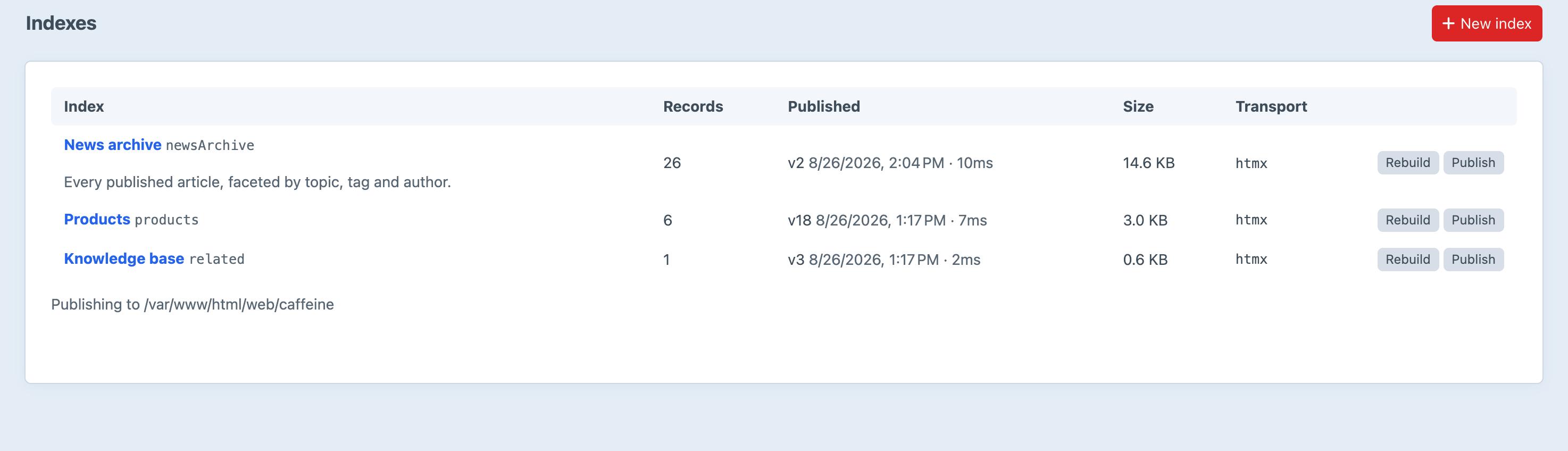
Every index, the artifact version that is live, and how long the last build took.
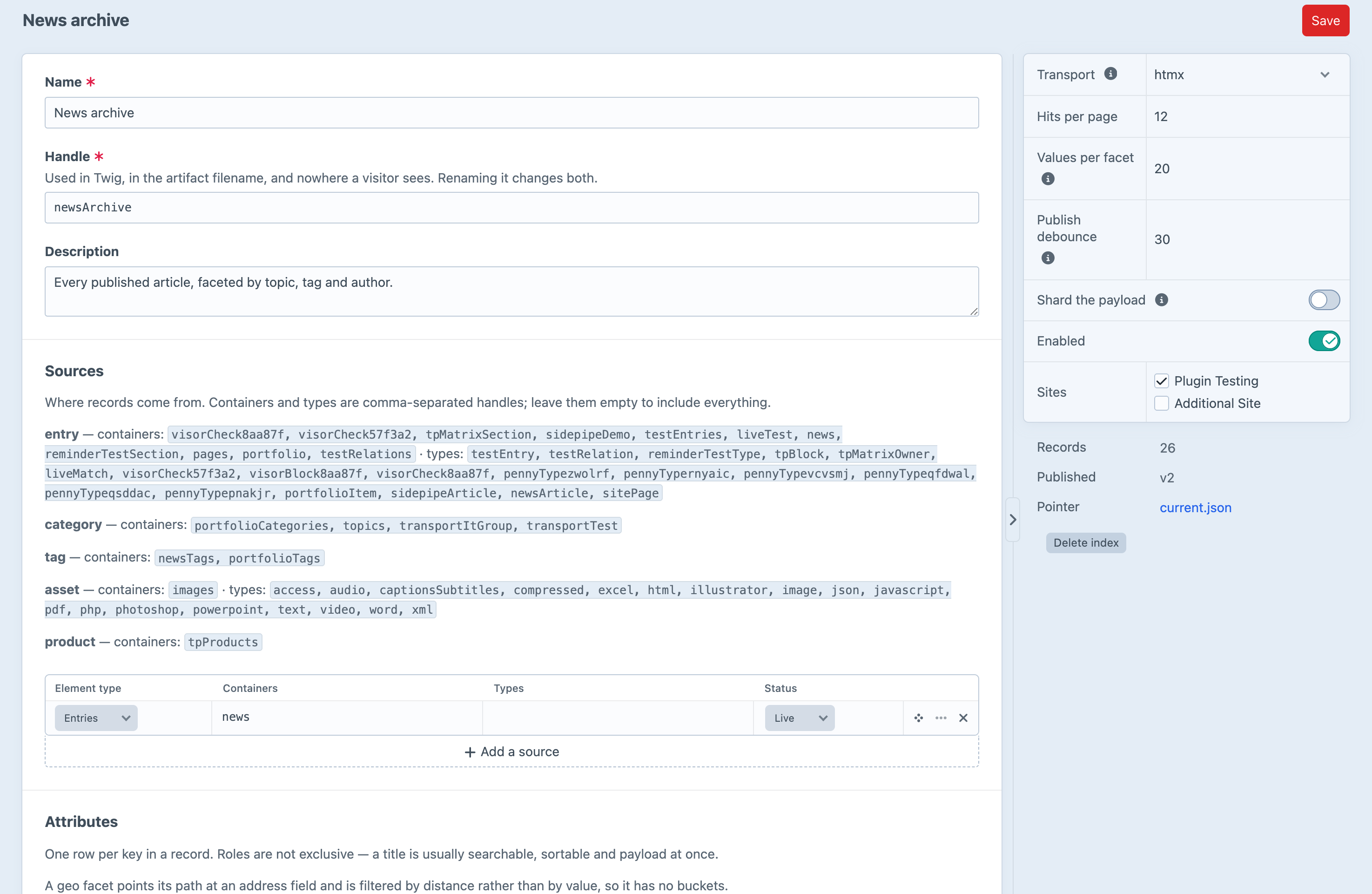
One index, modelled: where records come from, how many hits a page, and which artifact is current.
Screenshots from a live install, not mockups.
How It Works
Four ideas, each of which earns its place.
The Search Index Ships With the Data
Full-text tokenising happens once, in PHP, at index time, and the finished inverted index travels inside the artifact. The browser needs no search library at all — just a binary search over a sorted array of tokens. This is the single load-bearing idea in the design, and everything else follows from it.
One Spec, Two Engines, One Fixture Suite
The server renders the first paint and the browser takes over refinement, so the two must agree exactly — any disagreement shows up as the page rearranging itself under the visitor the moment they touch a control. There is a written specification, two implementations of it, and five pieces of shared logic pinned against each other by fixtures: the tokeniser, the varint codec, the value projection, the URL codec and the haversine.
It Works Without JavaScript
Every facet is a real <a href> and every widget a real form. The runtime intercepts controls that already work rather than inventing behaviour, which is why it is a few kilobytes and why switching JavaScript off degrades to ordinary page loads rather than to nothing. A crawler sees a working site.
It Survives a Full-Page Cache
Cached HTML embeds a stable pointer, never a versioned URL — the payload it names is content-addressed and immutable, so it can be cached forever while the pointer is cached not at all. A page cached months ago still finds today’s index, and a visitor arriving at a refined URL is refined before paint.
Three Ways to Serve It
Chosen per index, in the control panel. All three answer from the same artifact and the same two engines.
Fragment
A refinement fetches the region that changed and swaps it in. Hit markup stays in Twig, so a refined page is byte-identical to a full load of the same URL.
HTMX is supported but not required — the bundled runtime does its own fetch and swap in a few kilobytes.
Client-side
The browser fetches the artifact once and answers every refinement locally. No request, no latency, no server load — the whole index is already there.
Hits render from a <template> on the page. Comfortable to roughly 50,000 records.
Algolia JSON
The Algolia search-response shape, so InstantSearch, React and Vue InstantSearch and Autocomplete.js work against Caffeine unmodified.
Which also means a site can graduate to Typesense, Meilisearch or Algolia later without rewriting its front end.
The wire format is the Algolia response shape throughout — not because Caffeine bundles InstantSearch, but because adopting the de-facto standard means nothing you build on it is trapped here.
Measured, Not Claimed
A synthetic catalogue — 200 brands, twelve colours, three tags each, a price, a boolean, a four-level hierarchy and a four-field payload. The benchmark that produced these ships with the plugin, so you can re-take them on your own hardware.
| Records | Build | Artifact (gzipped) | Query — PHP | Query — browser |
|---|---|---|---|---|
| 1,000 | 13 ms | 56.9 KB | 1.4 ms | 0.7 ms |
| 10,000 | 183 ms | 535 KB | 8.1 ms | 3.5 ms |
| 100,000 | 2.9 s | 5.21 MB | 128 ms | 33 ms |
Narrowing is nearly free
The more refined the query, the less work either engine does. Two facets and a range over 100,000 records is 8 ms. The expensive case is the unrefined listing, because it touches every record — which is the opposite of how element queries behave.
Where the ceiling is
Client-side is comfortable to roughly 50,000 records, where the artifact is a few hundred kilobytes and decoding it takes under 100 ms. Past that, use the fragment transport and let the server answer. Stated plainly so you can tell before you buy whether it fits.
Getting Started
Install, model an index in the control panel, then build and publish it.
composer require justinholtweb/craft-caffeine
php craft plugin/install caffeineThen, once the index is defined
# map your content into records
php craft caffeine/index/build --all

# compile and publish the artifact
php craft caffeine/artifact/publishAfter that it maintains itself
Element saves mark the affected records stale and a debounced queue job rebuilds and republishes. Check what is live, and whether it is behind the CMS, with php craft caffeine/artifact/status — or confirm the published artifact still matches a fresh compile with caffeine/artifact/verify.
Pricing
Lite is free and genuinely useful. Pro is a one-off licence with an optional renewal for updates.
Lite
Free
- ✓ One index
- ✓ Entries
- ✓ String and boolean facets
- ✓ Fragment transport
- ✓ Relevance plus one sorting
- ✓ Full-text search, the Twig API, every widget
Pro
$149
one-off · $119/year for updates
- ✓ Unlimited indexes
- ✓ Categories, tags, assets, users, Commerce products
- ✓ Hierarchical, numeric, date and geo facets
- ✓ All three transports
- ✓ Unlimited sortings
- ✓ Stopwords and synonyms
- ✓ Record preview and query playground
If a Pro licence lapses, Caffeine downgrades rather than breaks: your stored index definitions are left untouched and the site keeps working with the Lite feature set, so renewing restores exactly what was there.
Frequently Asked Questions
Common questions about Caffeine.
Sprig runs an element query per interaction, and a facet count is its own query per value — a listing with five facets is dozens of queries every time someone ticks a box. Caffeine does that work once, at index time, and serves the answer as a static file. The trade is freshness: Caffeine serves what was published, and a save republishes after a short debounce. For a catalogue or an archive that is invisible; where a visitor must see their own write immediately, Sprig is the better tool. They coexist on one page happily.
For a listing, yes — Caffeine builds its own inverted index at build time and never touches searchindex. For a global site search across every element type, Craft’s own search is still the right tool.
An element save marks the affected records stale and a debounced queue job rebuilds and republishes — 30 seconds by default, configurable per index, or zero to republish immediately. A resave across thousands of entries collapses to one job rather than thousands.
The previously published artifact stays live and untouched. Nothing is written until the whole thing succeeds, and the pointer is swung last. A stale index is recoverable; a missing one takes the page down, so failure was designed around rather than left to chance.
Yes, and it was designed for it. Cached HTML embeds a stable pointer — never a versioned URL — and the payload it names is content-addressed and immutable, so it can be cached forever. A visitor arriving at a refined URL on a cached canonical page is refined before paint. There is a Blitz recipe in the docs.
Completely. Every facet is a real link and every widget a real form; the runtime intercepts controls that already work. Turn JavaScript off and refinements become ordinary page loads that server-render correctly, which is also what a crawler sees.
Client-side is comfortable to roughly 50,000 records. Past that the artifact is megabytes and the browser is doing too much work on load, so use the fragment transport and let the server answer — a server-side query over 100,000 records is 8 to 130 ms depending on how refined it is. The benchmarks that produced those figures ship with the plugin.
Value extractors read the field types that would otherwise index as an opaque object — links from Hyper, FreeLink or Craft’s own Link field, Google Maps addresses, Money, colours and dropdowns. They match on shape rather than class name, so a link field works whatever produced it, and you can register your own for anything unusual.
Yes, in two ways. Drop a template of the same name under _caffeine/ in your own templates directory and Caffeine renders yours instead of the widget. Or ignore the widgets entirely — they are thin wrappers over search.facet() and search.toggleUrl(), and reading those directly costs nothing.
Caffeine downgrades rather than breaks. Your stored index definitions are left untouched and the site keeps working with the Lite feature set — unsupported facet types are dropped, the transport falls back to fragments. Renewing restores exactly what was there, with no reconfiguration.
In your web root by default, served as a static file by nginx without touching PHP. Point it at any Craft filesystem instead — S3, a CDN-backed volume — and PHP never serves it at all. Precompressed .gz and .br copies are written alongside.
No. The wire format is the Algolia search-response shape, so InstantSearch and friends work against it unmodified, and a site can move to Typesense, Meilisearch or Algolia later without rewriting its front end.
Stop Counting the Same Things Twice
Free Lite edition, or $149 for everything.
Craft CMS 5.3+ · PHP 8.2+ · no runtime dependencies